Six Month Maintenance
For A Complete List with other Time Frames See Section:
Complete Maintenance Schedule
To maintain optimal operational efficiency, it's crucial to consistently follow maintenance schedules from both past and current time periods.
Six Month interval Operations
Estimated total man-hours of downtime: 735 minutes per BioDryer (12.25hr's)
The time estimate above accounts for the prior time period's operations and includes the operations for the current time period.
| Section | Description | Time Estimate (man hours) | LOTO? |
|---|---|---|---|
| Air System | Air-to-Air Heat Exchanger Inspection and Cleaning | 2 hours | LOTO is Required |
| Air System | Condensate Water Pump Inspection | 0.25 hours | Not Required |
| Loading Conveyor | Loading Screw Interior Visual Inspection | 1.25 hours | LOTO is Required |
| Loading Conveyor | Loading Screw Discharge Gates Inspection | 0.5 hours | LOTO is Required |
| Loading Conveyor | Loading Screw Gearbox Visual Inspection | 0.25 hours | Not Required |
Air-to-Air Heat Exchanger Visual Inspection and Cleaning
Visual inspection and cleaning of the Air-to-Air heat exchanger in the BioDryer Air System, is essential for ensuring the system's longevity and efficiency. This heat exchanger plays a critical role in the BioDryer's operation, facilitating the efficient transfer of heat and maintaining optimal internal conditions. Over time, however, particulates can accumulate within the heat exchanger, potentially impeding its performance and efficiency.
Personal Protective Equipment:
- Rubber dipped work gloves


Timeframe
- Estimated total of 2 man hours to complete.
Procedure
-
Safety First
- Put on the PPE to protect yourself from any potential hazards.
-
Initiate LOTO procedure
- If LOTO procedure is already initiated and the main switch is in "OFF" position, move on to step 3.
- Terminate power to the biodryer by turning the main switch on the electrical panel to the “OFF” position.
-
Close the ball valve
- Close the ball valve controlling the water supply to the air to air heat exchanger wash. (See Fig. 1)
-
Disconnect Attached Tube
- Disconnect the feeding tube from the steel flange located at the top of the heat exchanger by loosening the nut. (See Fig. 2)
-
Remove Washing Conduit Cover
- Remove the washing conduit cover to access the inside of the heat exchanger (See Fig. 2)
-
Inspect and Wash
- With the Air-to-Air heat exchanger now accessible, thoroughly rinse the heat exchanger plates using low-pressure water for 5 minutes, ensuring all plates are adequately cleaned.
-
Re-install Washing Conduit Cover
- Reinstall the washing conduit cover with the same bolts that were used to hold it in place prior. (See Fig. 2)
-
Re-install Tubes
- Reinstall the tubes that deliver the washing water. (See Fig. 2)
-
Open the Ball Valve
- Open the ball valve controlling the water supply, located on the lower section of the AirSkid. (See Fig. 1)
-
System Activation
- If everything is in order and no additional maintenance is required, the system can be energized and returned to normal operation.
- If Lockout-Tagout (LOTO) is engaged, remove it by turning the main switch on the electrical panel to the "ON" position. Reset the 24v components by pressing the blue reset button until the light goes out.
- Reactivate the BioDryer to normal operational mode using the Human-Machine Interface (HMI).
Figures:
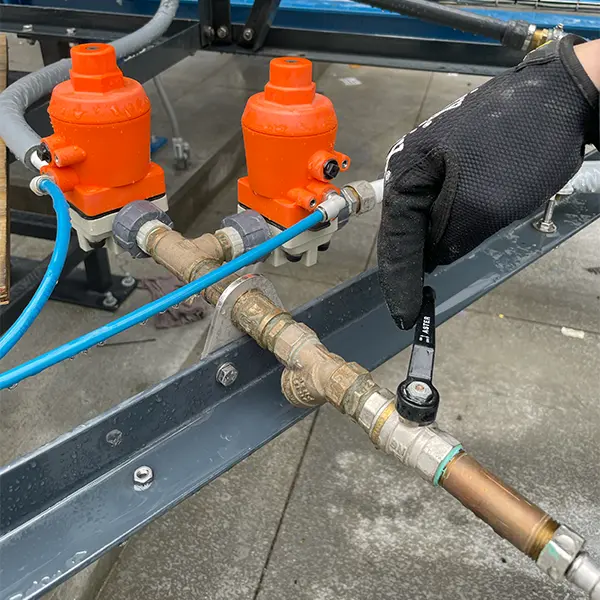
Figure #1
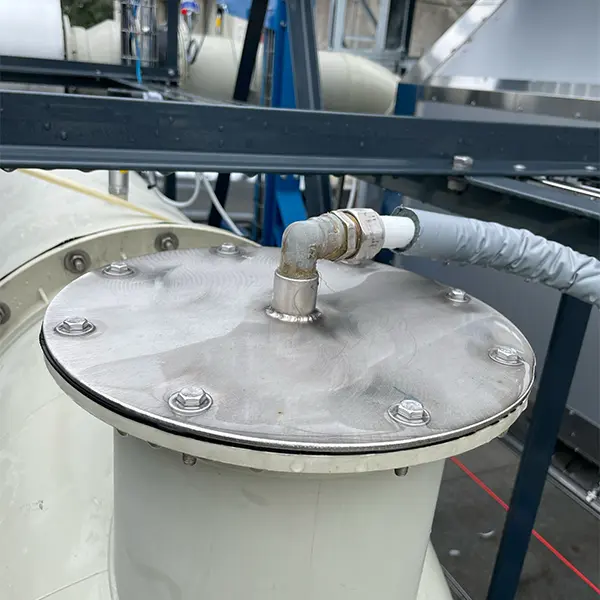
Figure #2
Condensate Water Pump Inspection
Regularly inspecting the water pump is part of maintaining the BioDryer's overall efficiency and reliability. This component plays a role in clearing the discharge tank when needed.
Personal Protective Equipment:
- Rubber dipped work gloves
Timeframe
- Estimated total of 0.25 man hours to complete.
Procedure
-
Safety First
- Put on the PPE to protect yourself from any potential hazards.
-
Locate the Condensate Water Pump
- The water pump will be located just beside the condensation water tank.
-
Verify the correct position
- Verify the position and alignment of the water pump has not rotated off axis. Verify the protective covers for the movable joints are intact and ensure the pump has not vibrated any nuts and bolts loose. (See Fig. 1)
-
Fill the Condensation Tank with water
- To properly test the pump, fill the condensation tank completely with water.
-
Run the Condensate water pump
- Clear out the water from the interior of the condensation tank with the pump. Linked operation.
-
Listen for Vibration and Noise
- While the pump is operating, pay attention for any vibration or noise that could be damage to the equipment. Make sure water is flowing correctly and no air bubbles are present.
-
System Activation
- If everything is in order and no additional maintenance is required, the system can be energized and returned to normal operation.
- If Lockout-Tagout (LOTO) is engaged, remove it by turning the main switch on the electrical panel to the "ON" position. Reset the 24v components by pressing the blue reset button until the light goes out.
- Reactivate the BioDryer to normal operational mode using the Human-Machine Interface (HMI).
Figures:
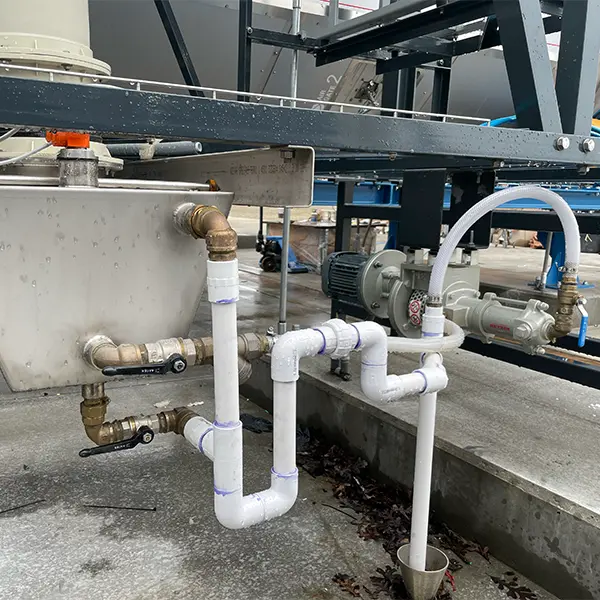
Figure #1
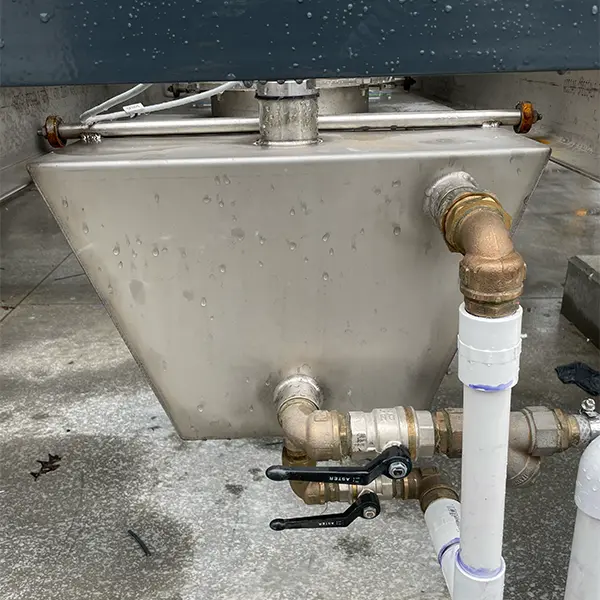
Figure #2
Loading Screw Interior Visual Inspection
Conducting a thorough visual inspection of the loading screw spiral and liner is a crucial maintenance activity for the BioDryer system. This inspection is key to identifying any potential damage or issues that might affect the smooth functioning of the screw conveyor. The loading screw Conveyor is an essential component of the BioDryer, responsible for the efficient and consistent transport of material into the system.
Personal Protective Equipment
Timeframe
- Estimated total of 2 man hours to complete.
Procedure
-
Safety First
- Put on the PPE to protect yourself from any potential hazards.
-
Initiate LOTO procedure
- If LOTO procedure is already initiated and the main switch is in "OFF" position, move on to step 3.
- Terminate power to the biodryer by turning the main switch on the electrical panel to the “OFF” position.
-
Remove lid of Loading conveyor
- Starting from the Motor side loosen the screws with the 17mm wrenches and remove the top sheets of metal one at a time. (see Figure #1)
-
Visual Inspection
- Carefully examine the loading screw spiral for any visible signs of damage. (see Figure #2)
- While the lid of the loading screw conveyor is distached inspect the HDPE liner for any cuts through the protective material.
- Pay attention to any loose screws on the liner or unusual conditions.
-
Re-install lid atop conveyor
- Using the same hardware and 17mm wrenches re-attach the lid of the loading screw conveyor
-
System Activation
- If everything is in order and no additional maintenance is required, the system can be energized and returned to normal operation.
- If Lockout-Tagout (LOTO) is engaged, remove it by turning the main switch on the electrical panel to the "ON" position. Reset the 24v components by pressing the blue reset button until the light goes out.
- Reactivate the BioDryer to normal operational mode using the Human-Machine Interface (HMI).
Figures:
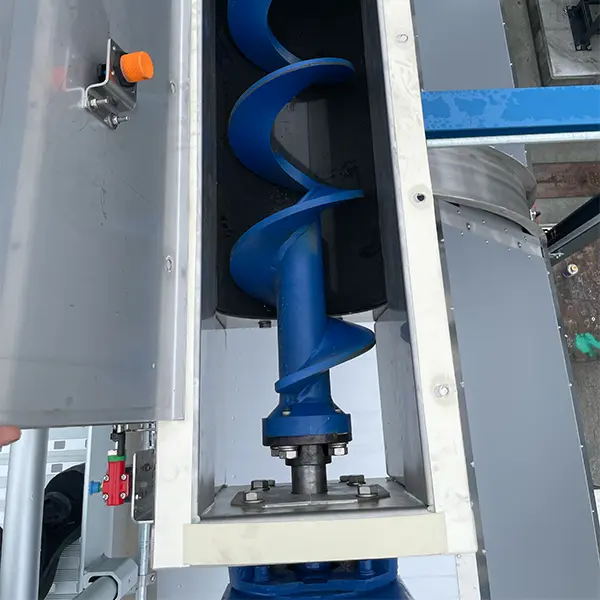
Figure #1
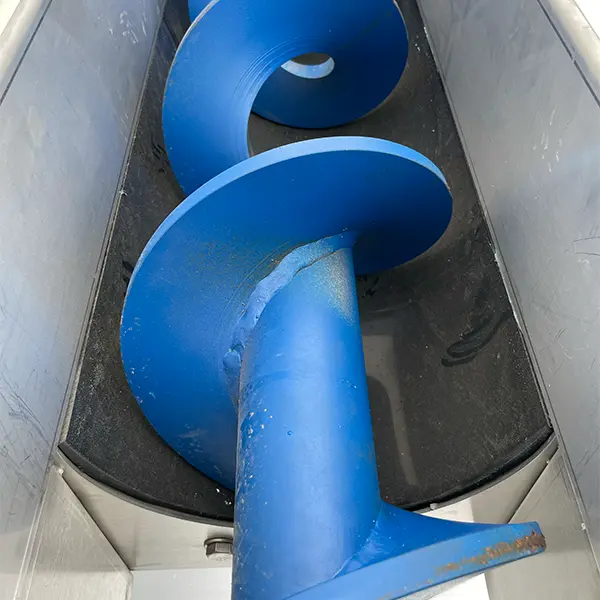
Figure #2
Loading Screw Discharge Gates Inspection
Closely examining the five loading screw's discharge gates involves checking for any physical deformities, cracks, or misalignments that might compromise their sealing capability. Leaks or gaps in these gates can lead to material spillage or operational inefficiencies.
Personal Protective Equipment:
Timeframe
- Estimated total of 0.5 man hours to complete.
Procedure
-
Safety First
- Put on the PPE to protect yourself from any potential hazards.
-
Set the BioDryer into Manual Mode
- Set the BioDryer into Manual-Mode and excersise the screw conveyor gates one at the time
-
Leak Inspection
- Examine the loading screw discharge gates for any signs of leaks or unusual conditions.
-
Gate Inspection
- Carefully inspect each gate one by one for any visible signs of damage or wear.
- Make sure all gates are opening and closing within 5 seconds. If not, an accumulation of biosolids may need to be cleared from the gate.
-
System Activation
- Reactivate the BioDryer to normal operational mode using the Human-Machine Interface (HMI).
Loading Screw Gearbox Visual Inspection
Regular visual inspection of the gearbox connected to the shaft and spiral of the BioDryer's loading screw is an essential maintenance task that plays a significant role in the system's operational integrity. This gearbox is a critical component in driving the loading screw, facilitating the movement of the shaft and spiral which are key to transporting materials efficiently within the BioDryer. During the inspection, careful attention is necessary to check for any signs of damage, such as cracks or wear on the gearbox, which could lead to mechanical issues and downtime.
Personal Protective Equipment
Timeframe
- Estimated total of 0.25 man hours to complete.
Procedure
-
Safety First
- Put on the PPE to protect yourself from any potential hazards.
-
Visual Inspection
- Using the attached catwalk for access carefully examine the loading screw conveyor gearbox for any visible signs of damage, wear, or irregularities. (see Figure #1 & #2)
- Pay attention to any loose components or noticible wear.
-
System Activation
- If everything is in order and no additional maintenance is required, the system can be energized and returned to normal operation.
- If Lockout-Tagout (LOTO) is engaged, remove it by turning the main switch on the electrical panel to the "ON" position. Reset the 24v components by pressing the blue reset button until the light goes out.
- Reactivate the BioDryer to normal operational mode using the Human-Machine Interface (HMI).
Figures:
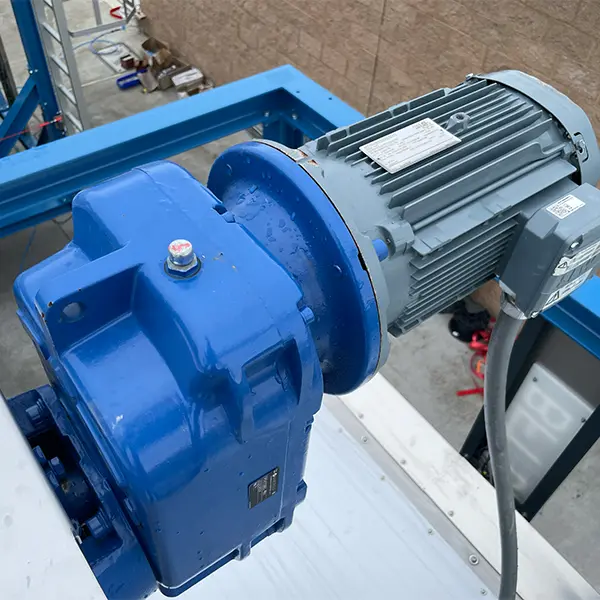
Figure #1
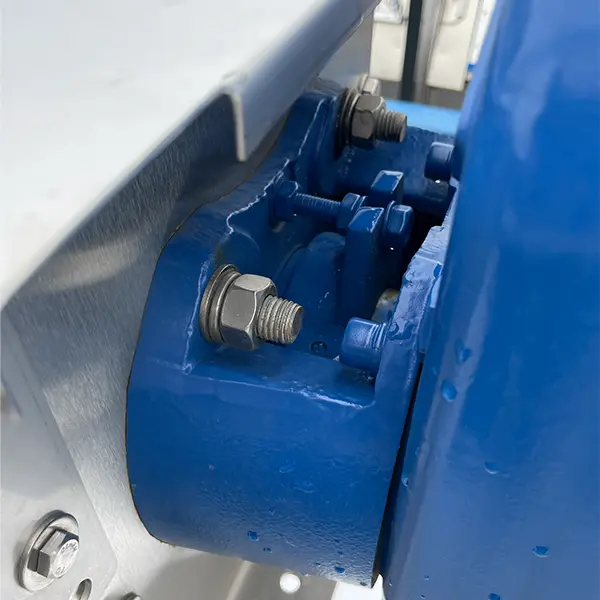
Figure #2