Replacing a Sludge Gate Proximity Sensor
Follow these steps to replace a sludge gate proximity sensor.
Personal Protective Equipment:

Required Tools
- Electrician scissors
- Wire strippers
- Wire ferrule crimps
- (1) 1.5mm hex key
- (1) Phillips head screwdriver
- (1) Mini flat head screwdriver
Consumables
- (5) Zip-ties
- (2) 20 AWG ferrules
- (1) CSH-253 Camozzi proximity sensor (quick disconnect)
- (1) CSH-233 Camozzi proximity sensor (if replacing a sensor without quick disconnect)
Timeframe
- Estimated total: 1 man-hour
Procedure
-
Initiate LOTO Procedure:
Terminate power to the biodryer by switching the main switch on the electrical panel to the “OFF” position. -
Discharge Pneumatic System:
Locate the pneumatic OFF/ON knob on the biodryer air structure. Push and twist the knob clockwise from “SUP” to “EXH” to release pressure in pneumatic lines. (see Figure 1)
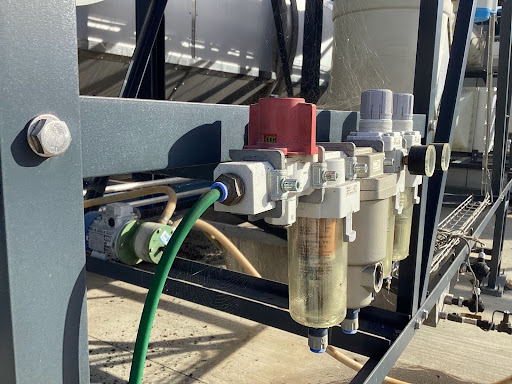
Figure 1
- Manually Open Sludge Gate:
Manually open the gate by pushing it towards the piston housing, ensuring it is fully open.
Disregard this step if replacing the sensor for the gate in the “closed” position.
- Remove Proximity Sensor:
Cut the zip-ties on the pneumatic hoses. Follow the cable through cable ducts and remove the electrical box cover to access the Plexus pod channel. Loosen the set screws and remove the sensor. (see Figure 2)
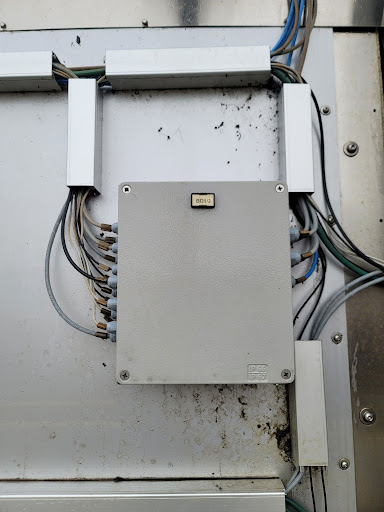
Figure 2
-
Install New Proximity Sensor:
Install the CSH-233 Camozzi sensor, fasten the cable, run it through cable ducts, and connect to the electrical box. Trim, strip, and crimp wires as needed. Secure the electrical box cover. -
Remove LOTO: Turn the main switch on the electrical panel to the “ON” position and reset the 24v components.
-
Resupply Pneumatic Air System:
Pressurize pneumatic lines by rotating the red OFF/ON knob counterclockwise from “EXH” to “SUP.”
Once pressurized, the opened gate will close. Ensure all tools and personnel are clear.
- Find the Correct Position:
Adjust the sensor position until the amber feedback light is illuminated, then secure the sensor.
Figures
Figure #1
Figure #2